
Skip to content
Fluid Checkout
  • Demo
  • Features
  • Add-ons
    • Complete Bundle Save 42%
    • Fluid Checkout PRO
    • Google Address Autocomplete
    • Address Book
    • EU-VAT Assistant
  • Pricing PRO
  • Docs
  • Support
  • My account
0,00 € 0 items
Home / Docs / Compatibility with plugin Order Delivery for WooCommerce by Kestrel

How can we help?

Getting started

  • Do I need to uninstall the free version when upgrading to PRO, or is Fluid Checkout Lite required?
  • Getting Started with Fluid Checkout
  • Translate Fluid Checkout plugins into your language

Features

  • WooCommerce edit cart on checkout — change quantity or remove items from the cart directly at the checkout page
  • Trust symbols — add security badges, trust seals and other trust symbols to strategic places on the checkout, cart and order received pages
  • Order pay – optimized and intuitive design for your WooCommerce Order Pay page
  • Local Pickup — WooCommerce Local Pickup hide shipping address when local pickup is selected
  • International phone numbers — WooCommerce checkout phone number validation and formatting based on country rules
  • Express checkout — quick payment buttons for Google Pay, Apple Pay and other payment methods
  • Design templates — match your brand styles on the WooCommerce Checkout template
  • Billing address positions — choose to display billing address before shipping, inside the shipping step or force shipping and billing address to a single section
  • Account matching / user matching — associate purchases with and existing customer account without logging in

Customizations

  • Change the icon or icon color for the cart button on mobile
  • Move the “Phone” field to the contact step
  • Configure cart quantity fields for decimal quantities
  • Change fields copied from shipping address to billing address
  • Move first and last name fields to the contact step
  • Customize Local Pickup location address and use multiple pickup locations
  • Customize button colors and other button styles
  • Customize colors of elements on Fluid Checkout
  • Customize template files for WooCommerce and Fluid Checkout
  • Customize checkout steps
  • Add custom house number field and make it required
  • Customize checkout fields and adding custom checkout fields
  • Safely add code snippets to your WooCommerce website

Compatibility

  • Compatibility with plugin SMS for WooCommerce by Zorem
  • Compatibility with plugin WooCommerce Smart Coupons by StoreApps
  • Compatibility with plugin Order Delivery for WooCommerce by Kestrel
  • Compatibility with plugin WooCommerce Germanized
  • Compatibility with plugin YITH WooCommerce Cart Messages Premium
  • Compatibility with plugin WooCommerce Delivery Slots by Iconic
  • Compatibility with plugin Mailchimp for WooCommerce
  • Compatibility with plugin WooCommerce Checkout Manager By QuadLayers
  • Compatibility with plugin Breakdance
  • Compatibility with theme Pressmart
  • Compatibility with theme Divi and the Divi Builder
  • Compatibility with WooCommerce Block-based checkout and cart forms
  • Compatibility with theme Botiga
  • Compatibility with theme Atomion
  • Compatibility with theme OceanWP
  • Compatibility with plugin Digits
  • Compatibility with plugin Storefront Powerpack
  • Troubleshooting – jQuery events or vanilla JavaScript events not working
  • Compatibility with theme ZK Nito
  • Compatibility with theme Woodmart
  • Compatibility with plugin “Plugin Organizer”

Troubleshooting

  • Troubleshooting – jQuery events or vanilla JavaScript events not working
  • Troubleshooting – Local pickup prevents customer from proving a shipping address, blocking other shipping methods
  • Troubleshooting – Trust symbols widgets randomly moving to other areas when switching themes

Account & Purchases

  • Can I get a refund for my purchase?
  • Finding my invoice, adding billing details and VAT number
  • New versions updates are not appearing on my website

Development

  • Troubleshooting – jQuery events or vanilla JavaScript events not working
  • Changelog format and semantic version numbers
  • Changelog – Fluid Checkout PRO & Lite
View Categories

Compatibility with plugin Order Delivery for WooCommerce by Kestrel

Delivery date field in a separate step section #

The delivery date from the plugin Order Delivery for WooCommerce by Kestrel will appear as separate step, that will be displayed on the optimal position within the checkout form according to the selected option from that plugin settings.
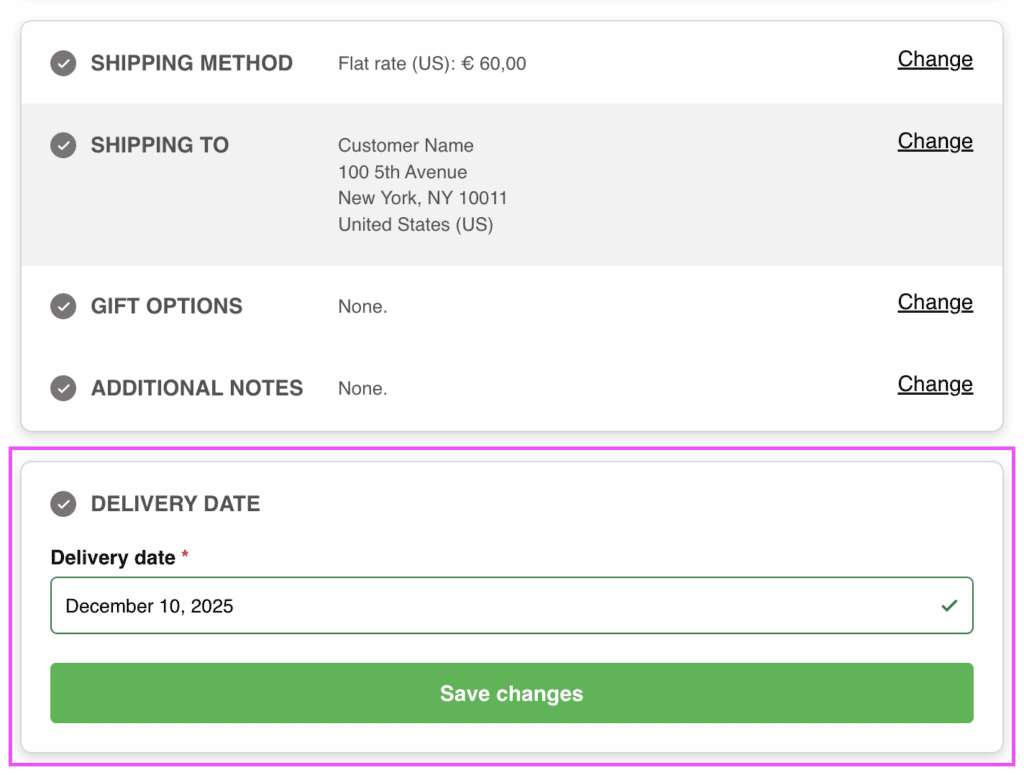
Screenshot showing the delivery date field as a separate step on the checkout form.

Extra integration options #

Some extra options are available in the integration settings at WP Admin > WooCommerce > Settings > Fluid Checkout > Integrations.
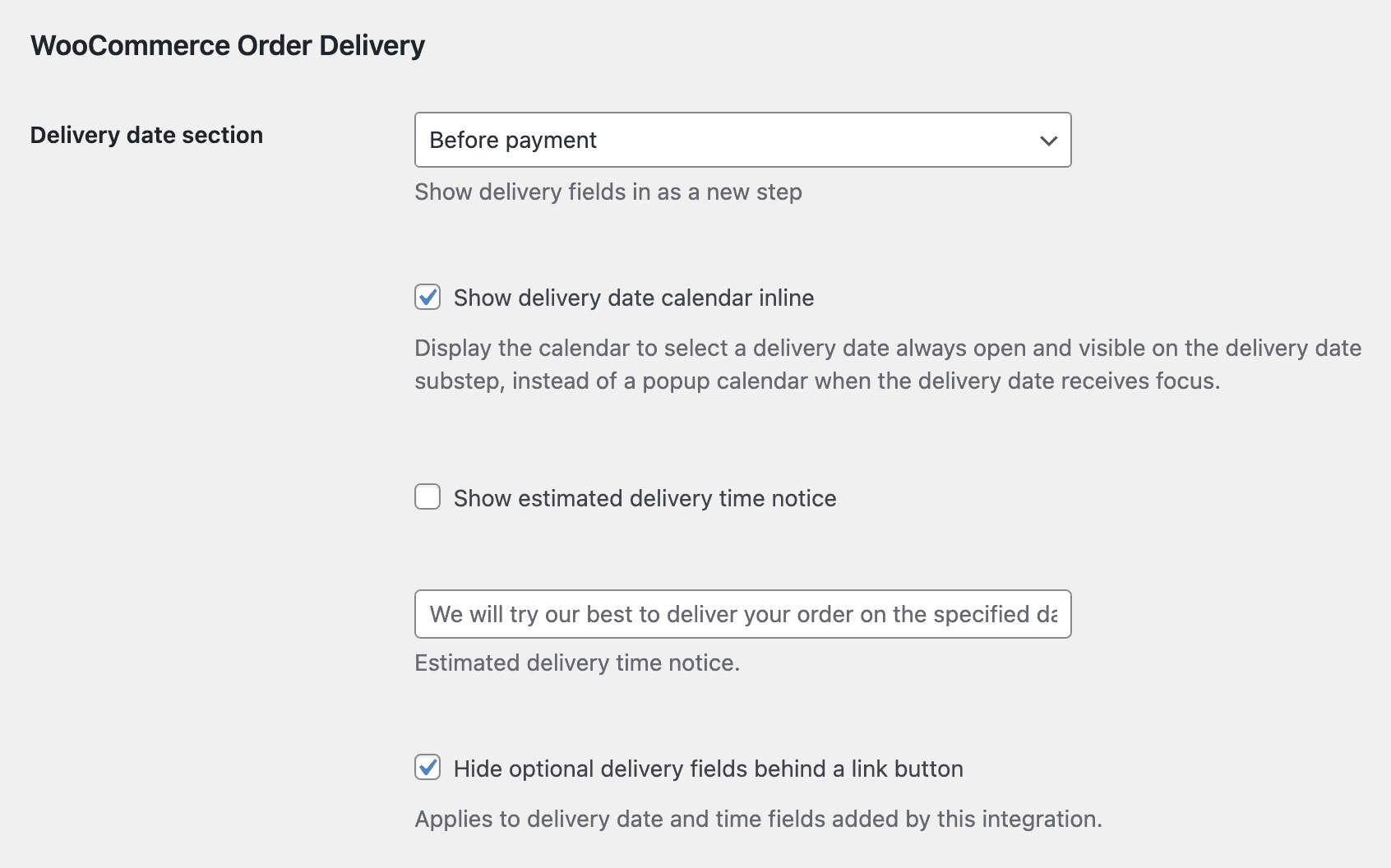
Screenshot showing the integration options for the plugin Order Delivery for WooCommerce by Kestrel.

Please note these options will only appear when the plugin is activated.

Inline calendar view #

When this option is selected, the delivery date will be displayed as an inline, already expanded calendar view showing the available dates:
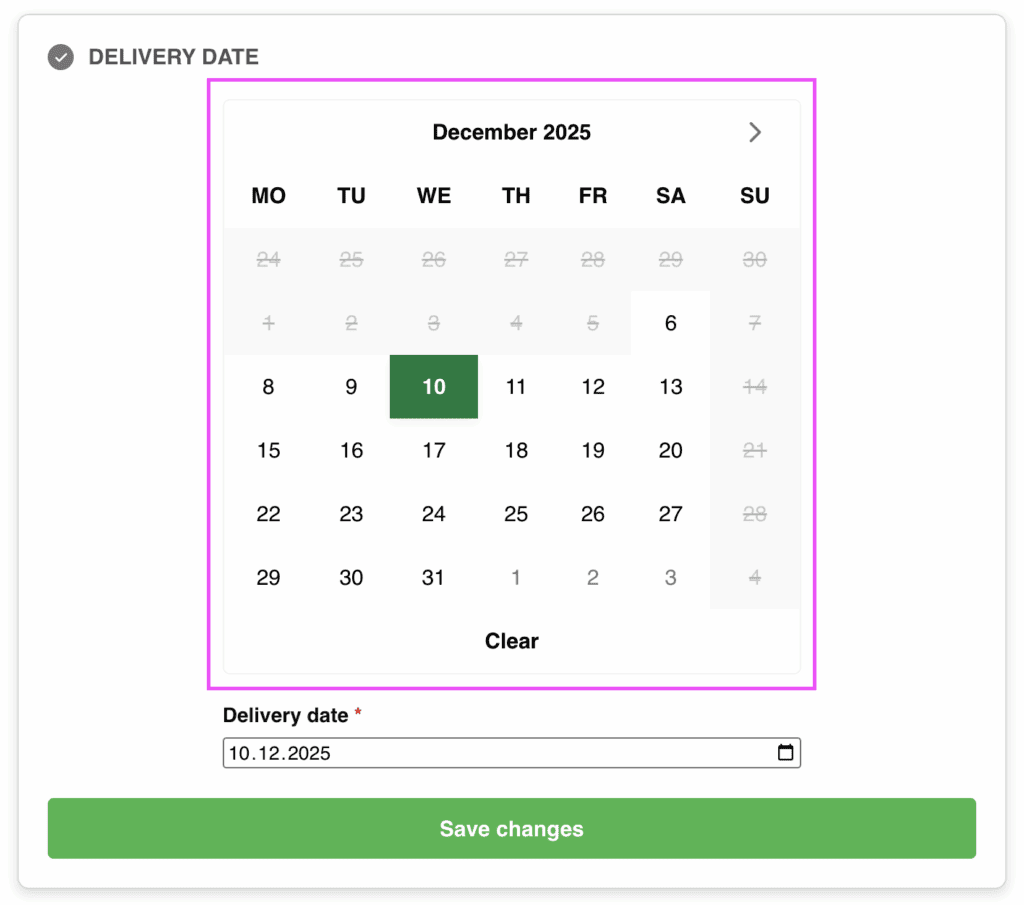
Screenshot showing the inline calendar view for Order Delivery for WooCommerce by Kestrel when using Fluid Checkout PRO.

How to enable the inline calendar view #

  • Go to WP Admin > WooCommerce > Settings > Fluid Checkout > Integrations;
  • Locate the section “WooCommerce Order Delivery”, which is related to the extra settings for this plugin;
  • Check the option “Show delivery date calendar inline”;
  • Save your changes.

Filter and action hooks #

Best practices #

If you are unsure about how to add the code snippets to your website, check our article:
How to safely add code snippets to your WooCommerce website

Actions #

  • fc_pro_woocommerce_order_delivery_before_fields This action hook fires before the delivery date fields are rendered in the checkout process.
  • fc_pro_woocommerce_order_delivery_after_fields This action hook fires after the delivery date fields are rendered in the checkout process.

Filters #

  • fc_pro_woocommerce_order_delivery_substep_title – Filters the sub-step title for order delivery substep.
  • fc_pro_woocommerce_order_delivery_position_args – Filters the position arguments for the order delivery sub-step.
  • fc_pro_woocommerce_order_delivery_priority – Filters the priority for the order delivery integration.
Still stuck? How can we help?

How can we help?

Updated on December 5, 2025
Compatibility with plugin WooCommerce Germanized
Table of Contents
  • Delivery date field in a separate step section
  • Extra integration options
  • Inline calendar view
    • How to enable the inline calendar view
  • Filter and action hooks
    • Best practices
    • Actions
    • Filters
Fluid Checkout

Frictionless Multi-step Checkout for WooCommerce

© 2021-2025 Fluid Checkout OÜ

Terms | Refunds | Privacy Policy | Cookies

Products
  • All products
  • Fluid Checkout PRO
  • Fluid Checkout Lite
  • Google Address Autocomplete add-on
  • Address Book add-on
  • EU-VAT Assistant add-on
Company
  • Support
  • Careers Hiring
  • My account
  • About
  • Homepage
  • Homepage
  • Features
  • Pricing PRO
  • Demo
  • Docs
  • Support
  • My account